A one-path VPN is easy to explain. Real days are messier: some local services may need Direct, travel and home may need different setups, or you may want different defaults without rebuilding everything each time.
VinePass is built for people who want that level of control—enthusiasts and users with higher routing needs. This article walks through how its routing scenes work, what Direct / Tunnel / Block mean in practice, and what happens when you change rules while connected.
Why routing shows up
- You turn the VPN on and open a familiar local service. Forced through one distant path, it may feel slower or fail for reasons other than “the VPN is broken.”
- You want most traffic protected, but a few work or home hostnames handled differently.
- You switch contexts—home, travel, a stricter setup—and want a different default ready.
For each destination, VinePass lets you choose Direct, VPN tunnel, or Block. Those choices are organized as selectable scenes you can switch as your day changes.
How VinePass structures the choice
Routing in VinePass has three layers:
- Scene. A named setup—Global Tunnel, or one you created.
- Policy. An ordered list inside a scene. Each policy has one action and match rules.
- Rule. A condition only: domain, suffix, keyword, expression, IP range, destination port, or a built-in name list. The action comes from the owning policy.
Actions:
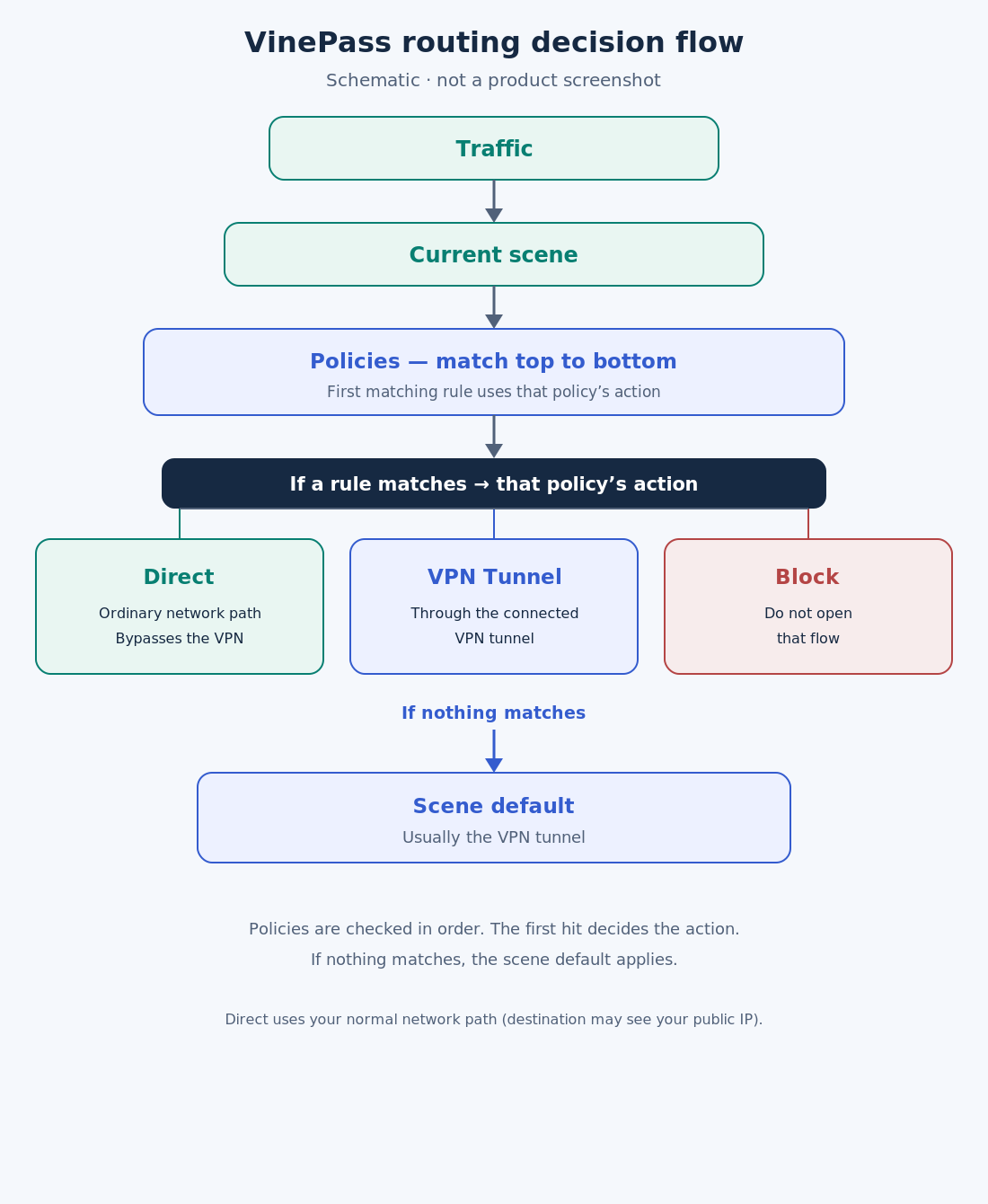
- Direct — use the device’s ordinary network path. Direct traffic bypasses the VPN: the destination may see the public IP of your normal network (home Wi‑Fi, mobile carrier, hotel network, and so on). HTTPS and similar application-layer encryption still protect content; Direct changes the path, not whether HTTPS is in use.
- VPN Tunnel — send traffic through the connected tunnel.
- Block — do not open that flow.
Global Tunnel means no special exceptions; the default is the tunnel. New custom scenes start the same way until you add policies. On first connect in some region or timezone setups, VinePass can offer a ready-made scene: a built-in country service list goes Direct, everything else the tunnel. That template is a curated list, not “every name under a country TLD.”
Policies are read top to bottom. Any matching rule uses its policy’s action. Unmatched traffic falls to the scene default—usually the tunnel. Order matters: two people can share the goal “local services Direct, everything else Tunnel” and still get different results if their policy lists differ.
Changing rules while you use the VPN
There is no separate Save button: edits to scenes or the current scene are written on the device as you change them. They stay on that phone until you change them again.
If the VPN is already connected, VinePass tries to push the new rule set to the running connection after a short delay. Those updates apply to new connections opened after the change. Connections that were already open typically keep their previous path until they close. To make every flow follow the new rules, disconnect and connect again.
If a live update fails, keep the old live path until you disconnect and connect again (or follow an in-app reconnect prompt). Your edits are already on the device; reconnecting is about applying them to traffic.
Limits that matter
Built-in lists include private/reserved domains and curated Iran- or Russia-related service lists:
- Those lists are domain collections, not all local-network IP ranges, and not every name under a national TLD. The
privatelist is not a one-tap LAN bypass; local IP ranges need their own CIDR rules if you want them Direct. - This routing screen does not offer per-app split, a one-tap LAN bypass, or user DNS server settings.
- Entering an IPv6 range in a rule is not the same as the system sending all IPv6 into the tunnel.
Looking ahead—and talking with us
If you need that fine control today, VinePass is the product built for it. VineVPN is aimed at a broader audience that mainly wants a trusted tunnel with few decisions. We are exploring simpler ways to bring useful routing there—without copying the full VinePass editor—such as a clear global preset, an optional short list of local services that go Direct, or a single scene switch. These are directions we are considering, not shipping promises or timelines. The two products will keep their own roles; this is not a migration from one to the other.
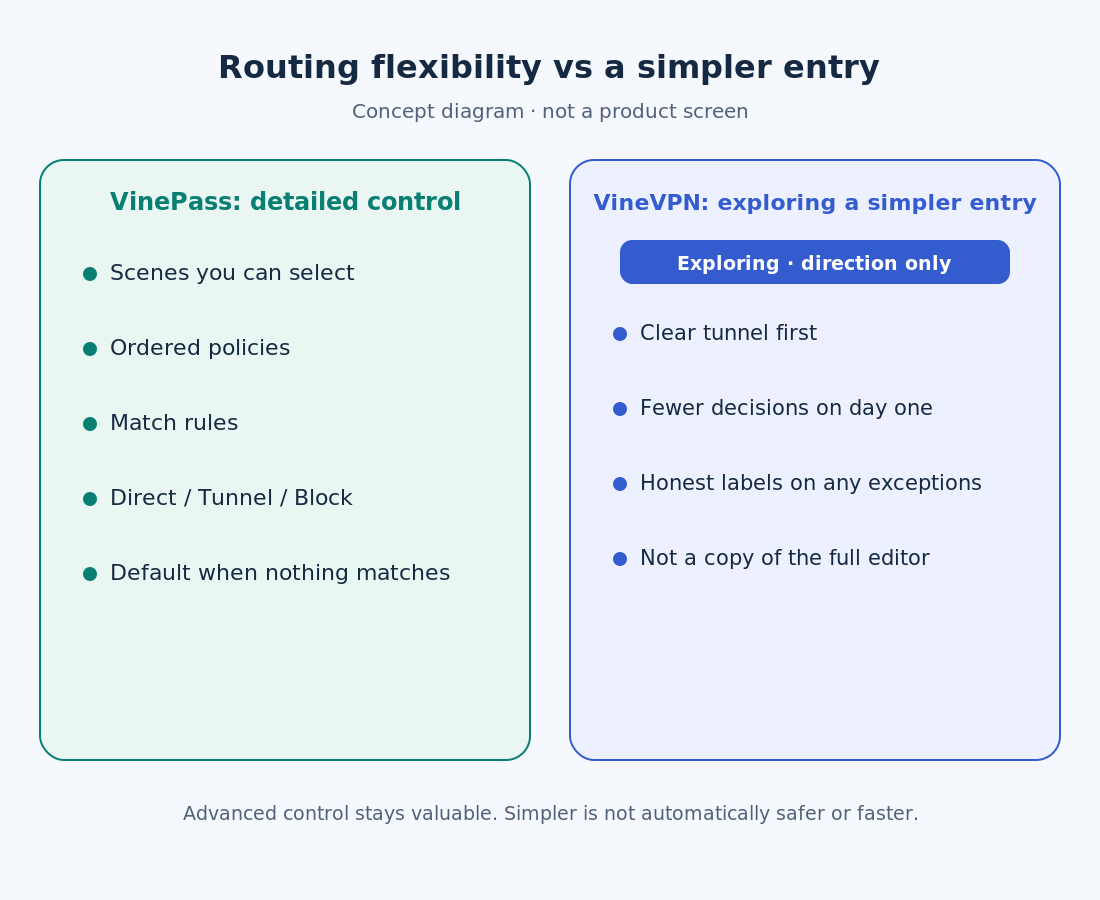
If you use VinePass routing, what do you keep: Global Tunnel only, one Direct list, or a fuller set of policies? If a simpler path on VineVPN would help you, what would “simple enough” look like in one sentence?
Tell us the situation at home or on the road that matters most. Reach the support page for your product:
- VineVPN: https://vinevpn.com/support
- VinePass: https://vinepass.org/support